From a ranked backlog to a sprint plan that holds.
Every project has a planning workspace: the backlog, requirements, the sprint plan, the relationship map, risks, forecasts and the decisions log, one tab each. Below, each part with the demo project's data.
Core: every editionScores, coverage, risks: TeamAuto-schedule, forecasts: Enterprise
Capacity
Points against everyone's time, person by person.
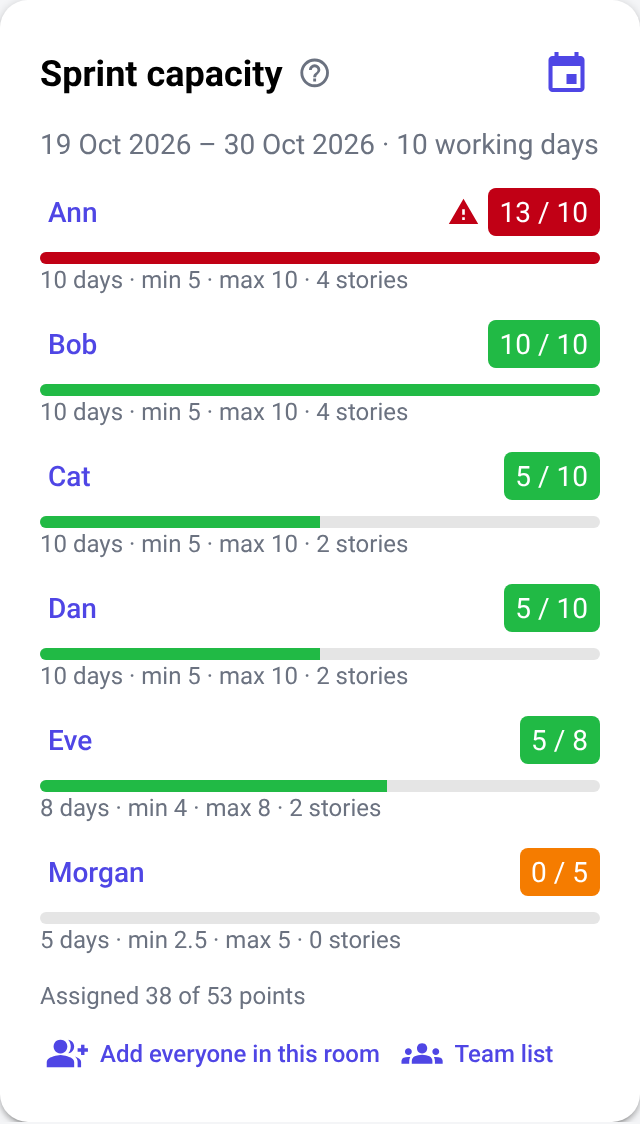
Each project keeps a team list with everyone's working days per sprint (or calendar days, or hours), seniority and availability. Team capacity is the total of everyone's availability, part-timers included. While you assign stories, the room's capacity panel adds up each person's points and turns red the moment someone has more than they can take on.
maximum = working days × availability × 1 point per day
minimum = maximum ÷ 2
Ann: 10 days → 5–10 points · assigned 13 → over
over the maximumunder the minimumwithin the limits
Change the points per day, or set a person's own minimum and maximum.
Holiday this sprint? Change one person's days for this sprint only; project holidays and the working week are counted.
Record delivery on each story, or read it from Jira: started, done, defects, rework, carry-over.
In the demoMorgan, the moderator, works half-time for the team and Eve 80%. Ann has 13 points against a maximum of 10, so her row is red.
Backlog and ranking scores: Team and Enterprise
A backlog ranked the way you decide.
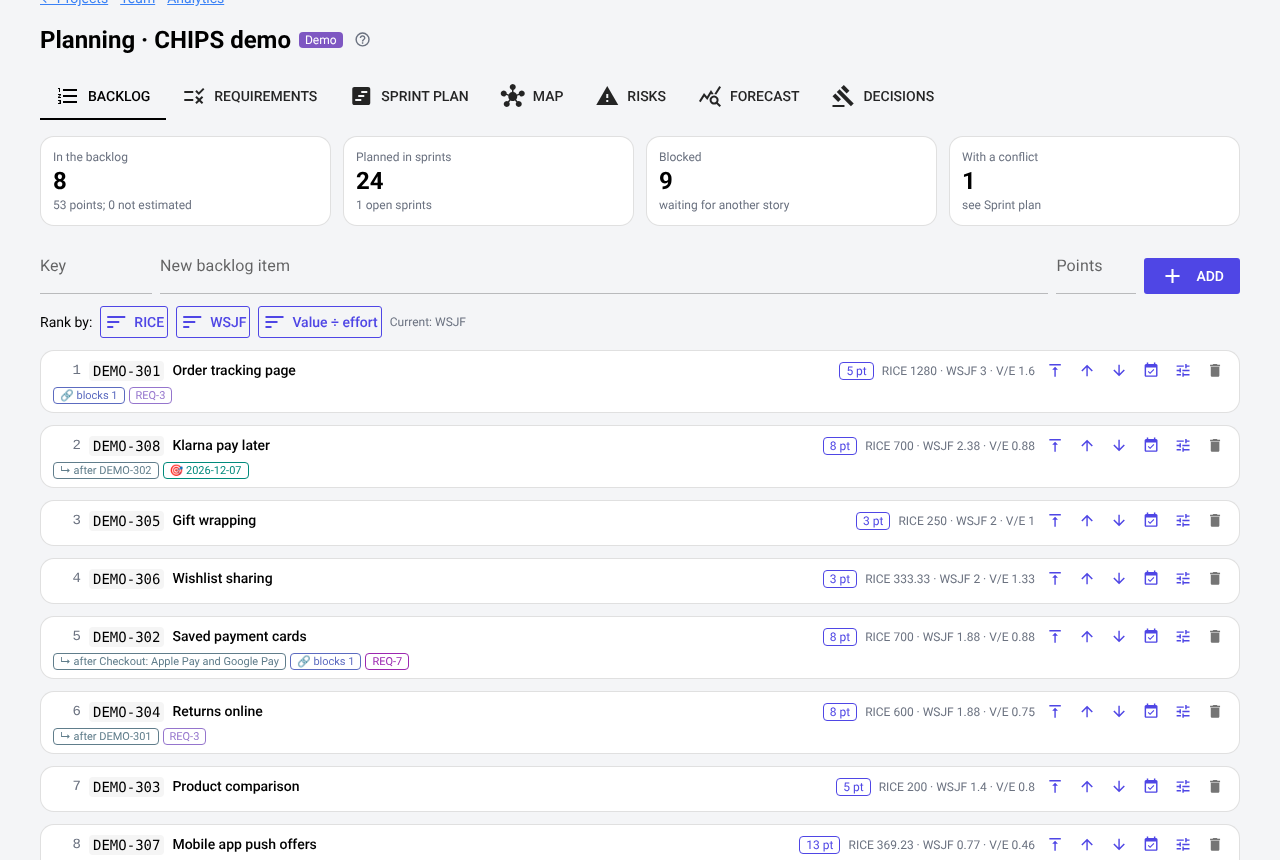
Stories that are not in a sprint wait in the project backlog. Rank them by hand — to the top, up, down — or by a score, then move them into a sprint; an epic takes its stories along.
RICE = reach × impact × confidence ÷ effort.
WSJF (weighted shortest job first) = (business value + time criticality + risk reduction) ÷ job size.
Value ÷ effort, for a quick ordering.
Badges on each story: what it waits for (↳ after DEMO-302), what it blocks, its requirements and its target date.
In the demo: eight stories wait for the next sprints, ranked by WSJF. “Klarna pay later” has a target date and waits for “Saved payment cards”.
One dialog per story, from the backlog, the room or the map:
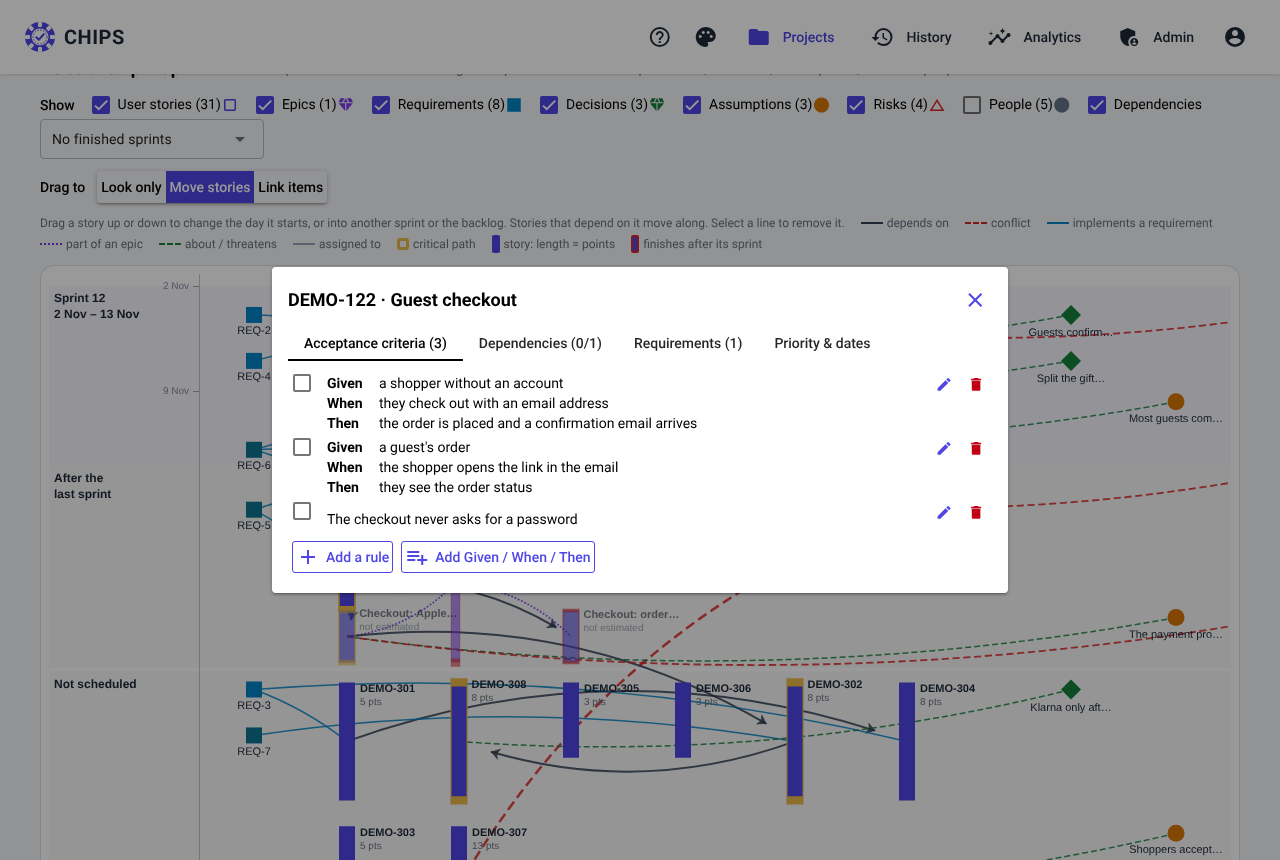
Acceptance criteria — rules or Given / When / Then scenarios, ticked when met. The team sees them under the story while voting.
Dependencies — what the story can only be finished after. Loops are refused.
Requirements — which requirements the story implements.
Priority & dates — scores, a target date, and pinned (auto-scheduling leaves it where it is).
In the demo: “Guest checkout” has three acceptance criteria — two Given / When / Then scenarios and the rule “The checkout never asks for a password”.
Requirements CSV import and coverage: Team and Enterprise
Every requirement traced to the stories that deliver it.
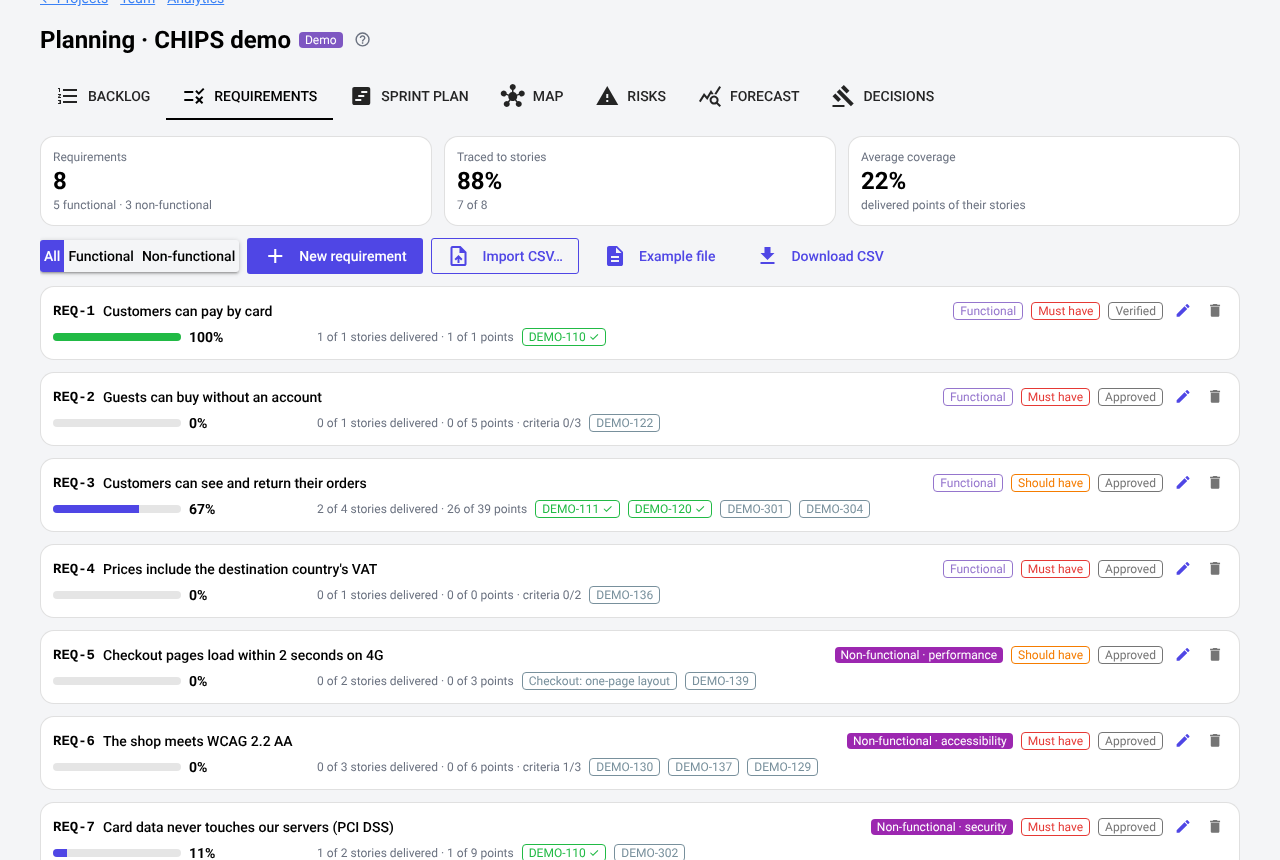
Write requirements in CHIPS or import them from a spreadsheet: key, title, description, functional or non-functional (with a category such as performance, accessibility or security), MoSCoW priority, status and source. Link the stories that implement them, and see the coverage: the share of their story points already delivered.
In the demo: eight requirements, three of them non-functional, imported in part from “Requirements workbook v3.xlsx”. REQ-1 “Customers can pay by card” is fully covered; REQ-8 is not traced to any story yet.
Sprint plan auto-schedule: Enterprise
What has to happen first, and what can run side by side.
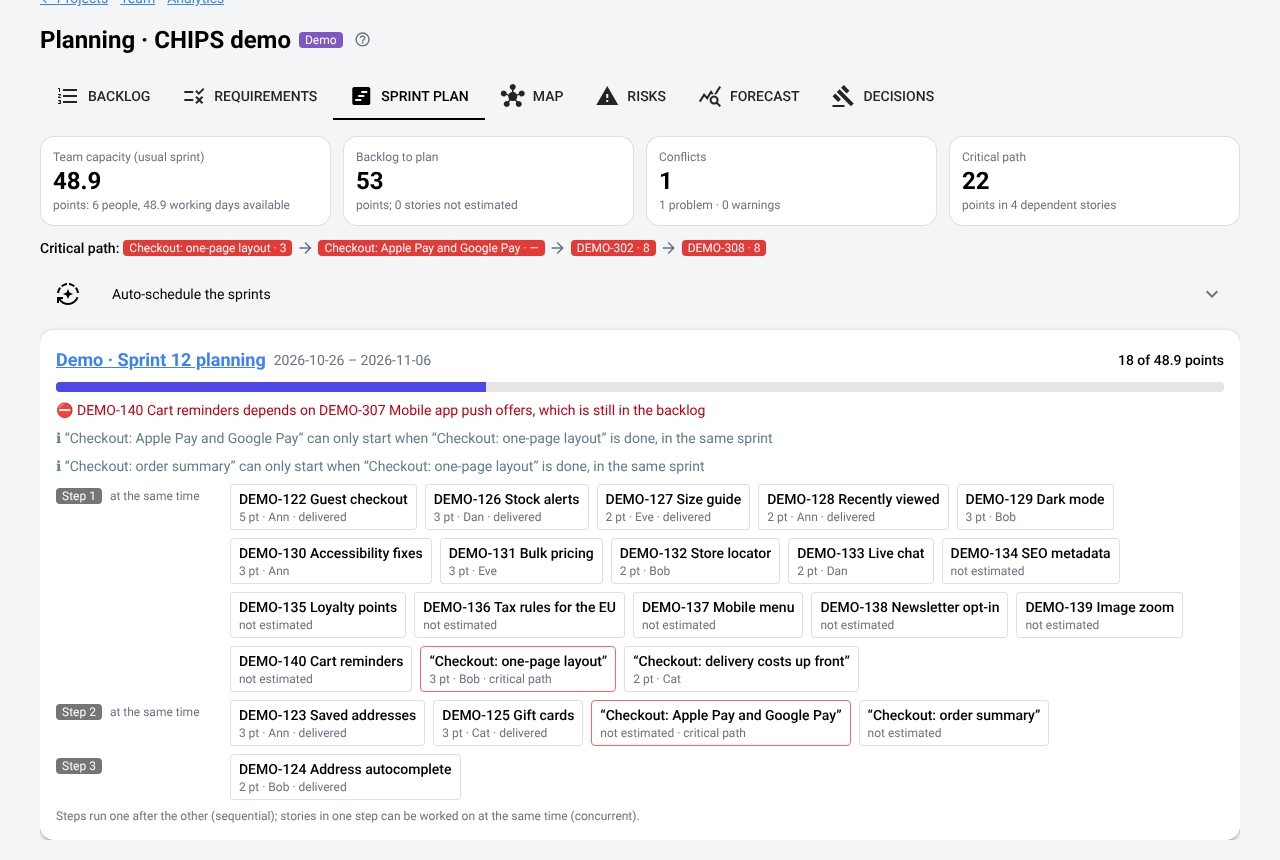
For each open sprint: its load against the team's capacity, its conflicts — dependencies planned later or not at all, sprints over capacity, people over their limit, missed target dates — and the order of work in steps. The critical path is the longest chain of dependent open work.
Auto-schedule fills the sprints in rank order, after each story's dependencies, within the team's capacity and each person's limit; proposed sprints are added where needed. Preview, then apply.
In the demo: “Cart reminders” is in sprint 12 but needs “Mobile app push offers”, still in the backlog — a conflict the plan and the relationship map show in red.
Risks Team and Enterprise
A risk register with ROAM and the critical path.
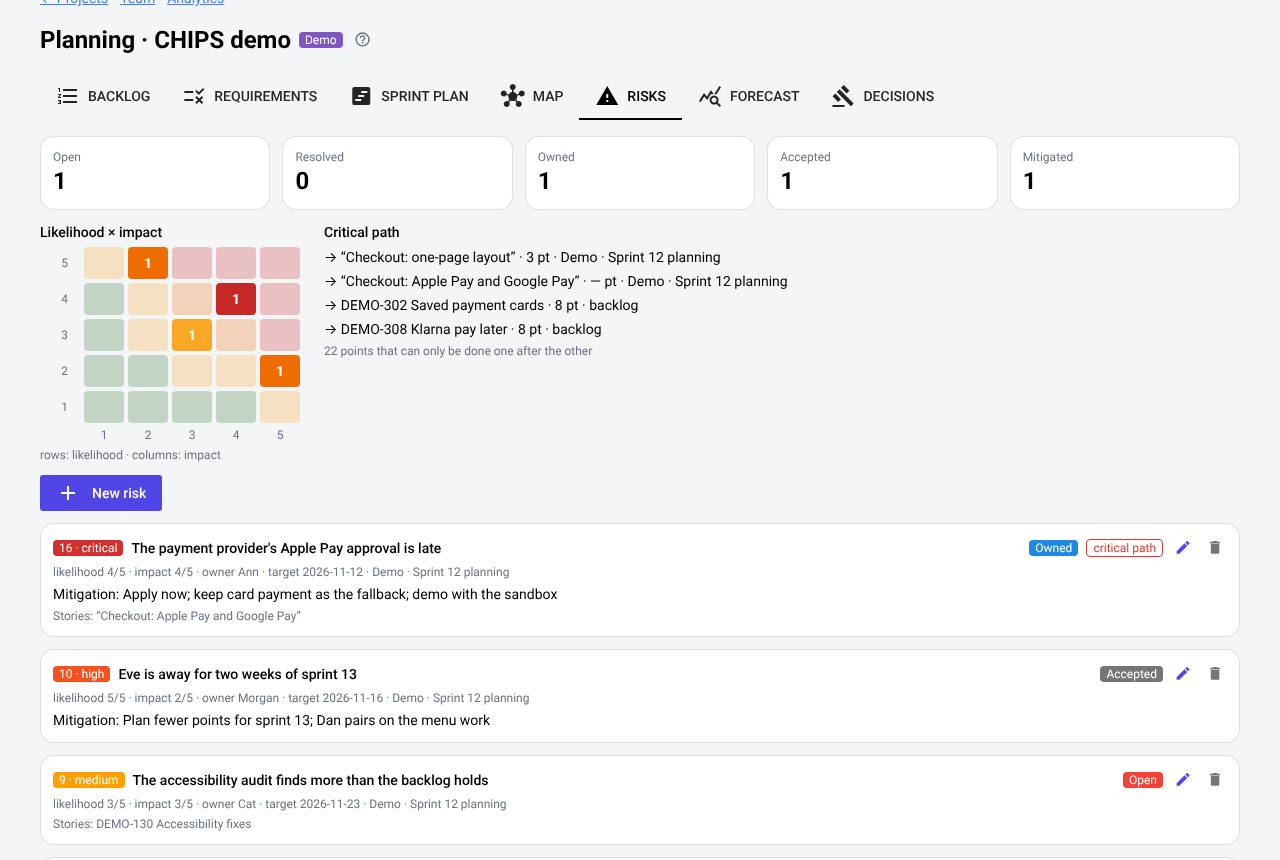
Likelihood and impact from 1 to 5, a score and severity, ROAM status (resolved, owned, accepted, mitigated, or still open), owner, mitigation, target date, and the sprint and stories at risk. Risks on the critical path are marked.
In the demo: four risks — “The payment provider's Apple Pay approval is late” is critical, owned by Ann, and threatens a story on the critical path.
Decisions and assumptions every edition
Remember what was decided, and what still has to be checked.
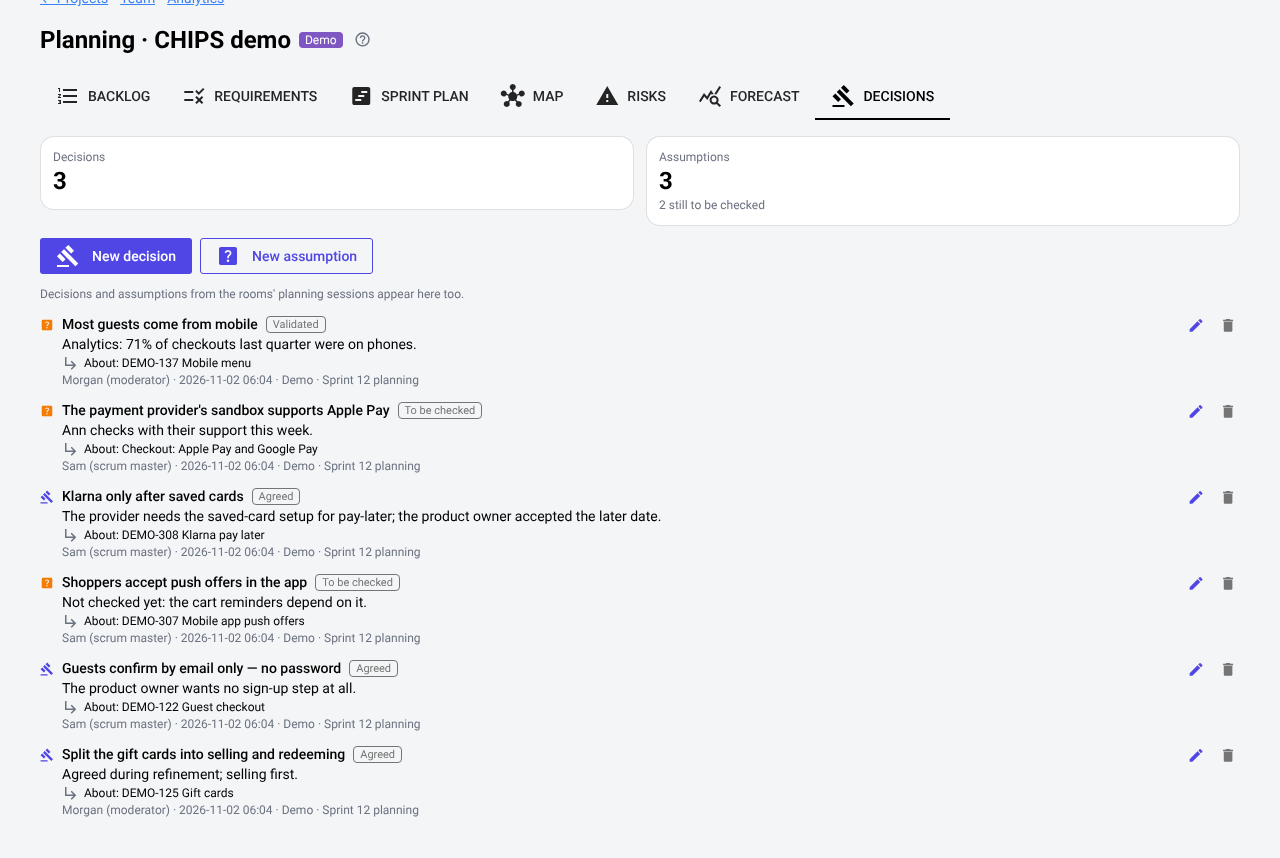
The scrum master or a moderator records decisions and assumptions during refinement, in the room or on the project, each about a story if it concerns one. Everyone in the room sees them; open assumptions stay marked until they are checked.
In the demo: three decisions and three assumptions, each about a story — for example “Guests confirm by email only — no password”, about “Guest checkout”.